标签:调错

易语言静态编译报错,提示“无法定位链接器!请检查 tools\link.ini 中的配置是否正确。 静态连接失败”的问题解决方法

易语言静态编译报错,提示“无法定位链接器!请检查 tools\link.ini 中的配置是否正确。 静态连接失败”的问题解决方法

易语言官方最新版,非破解版,在进行静态编译的时候会提示如下错误: 无法定位链接器!请检查 tools\link.ini 中的配置是否正确。 静态连接失败 这是因为易语言官方版本缺少第三方链接器,需要我们收到下载一个并配置好,方法如下: 1、到这里下载 http://www.pc6.

admin admin 2018-10-29
5.5K+ 0 0
koa2框架使用ctx.cookies.set()时报错ctx.cookies.set(‘str’, encodeURIComponent(‘我是regcookie’))的解决方法

koa2框架使用ctx.cookies.set()时报错ctx.cookies.set(‘str’, encodeURIComponent(‘我是regcookie’))的解决方法

在使用koa2中的cookie功能时,这样写: ctx.cookies.set('str','我是cookie内容'); 运行后会有如下报错: TypeError: argument value is invalid   这是因为koa的cookie默认不支持

admin admin 2018-09-09
3.8K+ 0 0
vue报错[Vue warn]: Unknown custom element: <mycom1> – did you register the component correctly? For recursive components, make sure to provide the “name” option.的解决方法

vue报错[Vue warn]: Unknown custom element: <mycom1> – did you register the component correctly? For recursive components, make sure to provide the “name” option.的解决方法

在vue开发的时候,调用组件后有如下报错: [Vue warn]: Unknown custom element: <mycom1> - did you register the component correctly? For recursive components, make s

admin admin 2018-09-01
1.7W+ 5 0
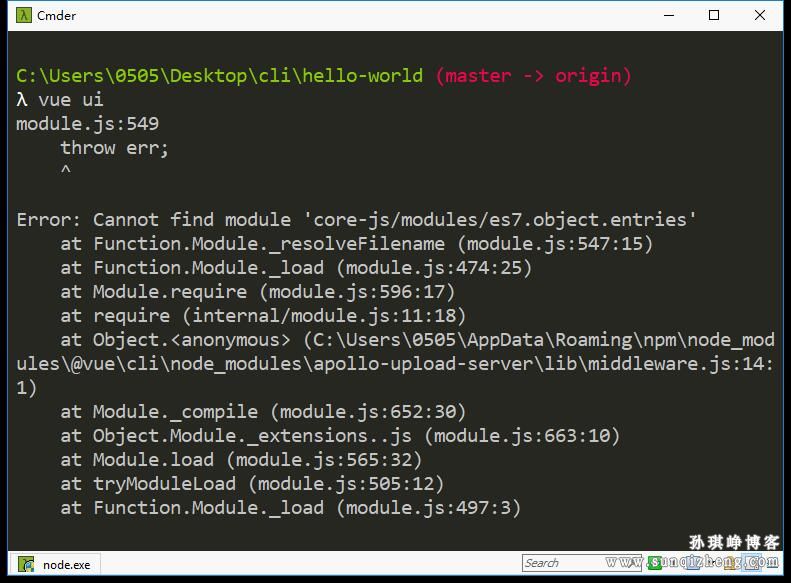
vue-cli 3.x版本执行vue ui命令后提示Error: Cannot find module ‘core-js/modules/es7.object.entries’报错的解决方法

vue-cli 3.x版本执行vue ui命令后提示Error: Cannot find module ‘core-js/modules/es7.object.entries’报错的解决方法

vue-cli新版提供了界面化项目管理的功能,简直一万个赞! 在安装 vue-cli 3.x  版本后,执行 vue ui 命令打开管理界面,命令行中出现如下错误: Error: Cannot find module 'core-js/modules/es7.object.entries'

admin admin 2018-08-23
1.3W+ 2 0
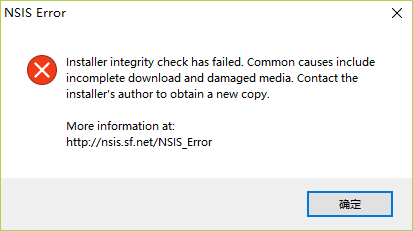
安装软件时报错Installer integrity check has failed. Common causes include incomplete download and damaged media. Contact the installer’s author to obtain a new copy.的解决方法

安装软件时报错Installer integrity check has failed. Common causes include incomplete download and damaged media. Contact the installer’s author to obtain a new copy.的解决方法

最近有同学反映在安装考拉(koala)编译器的时候报错(ps:本文使用所有安装软件遇到这个问题的情况): Installer integrity check has failed. Common causes include incomplete download and damaged medi

admin admin 2018-07-13
3.7K+ 0 0
神坑react native之unable to load script from assets ‘index.android bundle’ ,make sure your bundle is packaged correctly or youu’re runing a packager server

神坑react native之unable to load script from assets ‘index.android bundle’ ,make sure your bundle is packaged correctly or youu’re runing a packager server

最近在react native项目中执行 react-native run-android 命令后,模拟器设备中报错: unable to load script from assets ‘index.android bundle’ ,make sure your bundle is package

admin admin 2018-01-03
3.1K+ 0 0
神坑react native之Unzipping C:\Users\***\.gradle\wrapper\dists\gradle-2.14.1-all\8bnwg5hd3w55iofp58khbp6yv\gradle-2.14.1-all.zip to …

神坑react native之Unzipping C:\Users\***\.gradle\wrapper\dists\gradle-2.14.1-all\8bnwg5hd3w55iofp58khbp6yv\gradle-2.14.1-all.zip to …

在react antive模拟器调试中,执行 ract-antive run-android 后报错: Unzipping C:\Users\sqz\.gradle\wrapper\dists\gradle-2.14.1-all\8bnwg5hd3w55iofp58khbp6yv\gradle-2.

admin admin 2017-12-20
3.7K+ 0 0
神坑react native之unable to load script from assets ‘index.android.bundle’报错的解决方法

神坑react native之unable to load script from assets ‘index.android.bundle’报错的解决方法

windows环境下,执行 react-native run-android 对项目进行调试的时候,会遇到在模拟器中报错的情况: unable to load script from assets 'index.android.bundle' 这种情况一般出现在第一次连接模拟器或网络环境发生变化的时

admin admin 2017-12-07
4.3K+ 0 0
视频video标签在移动端微信中默认全屏播放的解决方案

视频video标签在移动端微信中默认全屏播放的解决方案

最近后盾人移动端上线了,开发挺顺利,但也遇到几个小坑。 后盾人中的视频是用video视频标签引入的,当在微信中打开后盾人,播放视频的时候,视频默认会全屏播放。 安卓和ios下都存在此问题,解决方法如下: iOS端:给video标签加上 playsinline="true" 属性就行了。一开始看

admin admin 2017-12-06
5.2K+ 2 0
神坑react native之A problem occurred configuring project ‘:app’报错的解决方法

神坑react native之A problem occurred configuring project ‘:app’报错的解决方法

windows平台下,react native本地项目连接模拟器调试,在执行 react-native run-android 命令后报错: * What went wrong: A problem occurred configuring project ':app'. > SDK loca

admin admin 2017-12-06
1W+ 1 0
1 2